Chat
Chat is the main way you work with your companion. Open Chats from the sidebar, or start typing on Home.
Sending a message
Section titled “Sending a message”Type and hit enter. You can also:
- Dictate — tap the microphone and speak; the transcript lands in the input so you can check it before sending
- Attach images — paste, drag, or pick them, and ask about what’s in them
- Use a skill — type
/to pick one of your Skills for that message
Watching your companion work
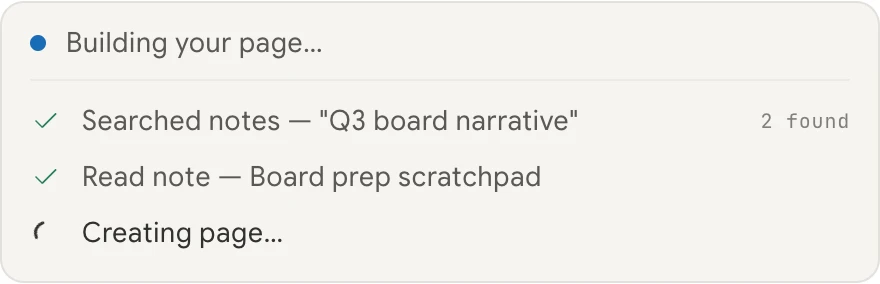
Section titled “Watching your companion work”When your companion needs to do something — look up your calendar, search your notes, draft a page — it shows an activity block with the steps it’s taking, in plain language: “Looking up your tasks”, “Preparing your note”.
Steps tick over as they finish, so you can see what’s actually happening rather than watching a spinner. Longer runs keep the list scrollable rather than filling the screen.
Stopping a reply
Section titled “Stopping a reply”Changed your mind mid-answer? Select Stop. The reply stops on the server, not just in your browser — so nothing carries on running in the background, and you aren’t charged for work you cancelled.
Resource cards
Section titled “Resource cards”When your companion creates something — a task, a note, a page, a project — it appears as a card in the conversation rather than as a wall of text. Tap the card to open the real thing.
The same happens when your companion mentions something that already exists, so you can jump straight to it.
Formatting
Section titled “Formatting”Your companion’s replies render properly: headings, lists, tables, and syntax-highlighted code. Code blocks have a copy button, and wide tables scroll inside their own container instead of stretching the page.
Reading a message aloud
Section titled “Reading a message aloud”Every message has a speaker icon — tap it to have your companion read that message out loud in your chosen voice. See Voice.
Across your devices
Section titled “Across your devices”Your conversation list syncs automatically, so a chat you start on your laptop is there on your phone.
If something goes wrong
Section titled “If something goes wrong”If a reply fails partway, your companion recovers the conversation rather than losing it, and you can retry. If you’re out of allowance and credit, it tells you plainly instead of failing silently — see Your usage allowance.